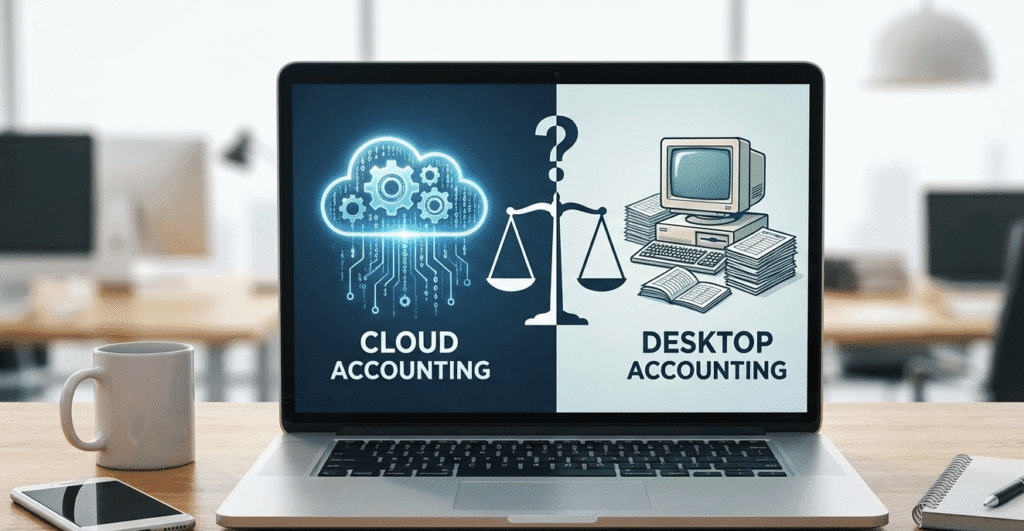
Accounting has come a long way from bulky ledgers and local PC installations. Over the past few years, businesses in the US, UK, Australia, and even India have steadily moved from old desktop-based accounting systems/software to cloud based software\platforms like QuickBooks Online, Xero, Zoho Books and others. Today, cloud accounting becoming the default choice for forward-looking businesses and companies that want accuracy, real-time visibility, scaling and seamless collaboration with outsourced bookkeeping teams like XpertKeeping.
But despite the momentum in cloud based software acceptance, many business owners still ask a simple question:
“Is cloud-based accounting software really better than desktop accounting system?”
The answer is not straight, it depends on how your business operates, the level of flexibility you need in your business and how comfortable you are with automation and remote access. Let’s break it down so that you can make the right decision according to your business need.
1. What is Desktop Accounting Software?
Desktop accounting software is the traditional model. The program is installed on a local computer, and all financial data lives on that machine — sometimes backed up manually, sometimes not.
Common examples include:
- QuickBooks Desktop
- Tally (India)
For decades, this was considered the standard process, But as businesses started going digital with time and technology and remote work became normal, desktop programs began to show their limitations and people started to shift towards cloud-based software.
Typical characteristics of desktop accounting:
- Installed on one system
- Manual backups
- Limited multi-user access
- Performance depends on device hardware
- Updates require paid upgrades
- Data sharing is difficult
2. What is Cloud Accounting Software ?
Cloud accounting completely changes how businesses manage their books Instead of storing data on one computer, everything runs online, securely, automatically, and in real time.
Popular cloud accounting software are as under:
- QuickBooks Online (QBO)
- Xero
- Zoho Books
- MYOB Cloud (Australia)
- FreshBooks
Rather than buying software once, companies pay a monthly or yearly subscription to use cloud-based software, In return, they get frequent updates, automation, mobility, and access to a partner ecosystem that makes accounting far more powerful.
Key characteristics and specification of cloud accounting:
- Access anytime, anywhere via browser or mobile app
- Real-time financial updates
- Automatic backups
- Easy collaboration with accountants and bookkeepers
- Integrations with payroll, POS, CRM, eCommerce
- Strong security and encryption
- Automatic software updates
In cloud accounting software you can grow your accounting with your business, instead of slowing it down.
3. Cloud Accounting vs Desktop Accounting: Quick Comparison
A. Accessibility
- Desktop: In desktop-based accounting software you must be physically present at the computer where the software is installed.
- Cloud: With Cloud based software you can open your books from home, office, or anywhere in the world.
In a global and remote-working landscape this alone is a game-changer. Cloud platforms also allow your bookkeeper like Xpetkeeping to update your accounts in real time without waiting for files or backups from anywhere in the world.
B. Data Security
Many assume desktop is safer because the data is “local,” but it’s actually the opposite.
- Desktop: At risk from system crashes, theft, hardware failure, viruses.
- Cloud: Uses bank-level encryption, multi-factor authentication, secure servers, automatic redundancy.
Cloud providers like Xero and QuickBooks Online invest millions every year into cybersecurity something a small business cannot match with local systems.
C. Backups and Recovery
- Desktop: Manual backups, often forgotten or outdated.
- Cloud: In cloud-based software there are automatic daily backups, version history, and one-click restore facilities.
One spilled coffee on your laptop can wipe out years of desktop accounting data.
Cloud eliminates this risk.
D. Multi-User Collaboration
- Desktop: Additional users require local network configuration, and performance often slows down.
- Cloud: Unlimited collaboration from anywhere.
This is especially helpful when businesses work with external accountants and outsourced bookkeeping partners like XpertKeeping.
E. Automation Capabilities
Cloud accounting shines here because cloud accounting have capabilities in automation
Examples of automation in cloud platforms:
- Auto bank feeds
- Recurring invoices
- AI-based transaction categorization
- Receipt capture via mobile
- Automated reconciliation
These features reduce manual work and errors, improving accuracy — which is one reason why many US and Australian businesses have rapidly adopted cloud solutions.
F. Cost & Scalability
Desktop software often looks cheaper upfront, but costs stack up:
- Hardware upgrades
- Backup storage
- Paid software upgrades
- IT support
- File-sharing tools
Cloud accounting follows a subscription model, but:
- Maintenance is included
- Updates are free
- No hardware upgrades needed
- Easily scalable as the business grows
It’s financially predictable and reduces IT dependency.
G. Integration Ecosystem
Cloud accounting platforms integrate with other useful software also like:
- Cloud accounting platforms integrate with Payroll software, like (Gusto, ADP and others)
- Cloud accounting platforms integrate with Payment gateways, like (Stripe, PayPal, Square)
- Cloud accounting platforms integrate with eCommerce platforms, like (Shopify, Amazon)
- It integrates with CRM systems, like (HubSpot, Zoho CRM)
- It also integrates with Inventory tools, like (DEAR, Unleashed)
Desktop systems cannot match this level of connectivity.
4. Examples:
QuickBooks Desktop v/s QuickBooks Online
QuickBooks Desktop still has strong features specifically for businesses that have heavy inventory, but QuickBooks Online (QBO) is very much flexible in comparison with QuickBooks desktop.
Why QBO is preferred today:
- Real-time bank feeds
- Mobile access
- App integrations
- Automatic updates
- Easier for remote accountants/bookkeepers
Many US businesses are now shifting from Desktop to QBO because Intuit is focusing on its cloud ecosystem.
Xero – A Pure Cloud Accounting Solution
Xero is Largely popular in the UK and Australia, its known for:
- A clean interface
- Powerful bank reconciliation system
- Deep integrations with other systems
- Multi-currency support
- Strong accountant/bookkeeper collaboration tools inbuilt
Because Xero was built cloud-first, it avoids many legacy limitations which have other software.
5. Market Adoption Trends for Cloud based software Cloud is Winning Everywhere
Cloud is Winning Everywhere, globally cloud accounting adoption has surged over the past few years.
Approximate share of cloud accounting (2025 estimates):
- USA: 65%+
- UK: 65–70%
- Australia: 70%+
- India: 30–35% and rising quickly
Every trend report shows the same direction — more automation, more remote collaboration, and stronger preference for cloud platforms.
Businesses that adopt cloud accounting early in the start often enjoy smoother day to day operations and better decision-making because they have real-time financial data and insights.
6. Why Cloud Accounting is Perfect for Outsourced Bookkeeping
For firms like XpertKeeping, cloud accounting is what makes offshore bookkeeping smooth and efficient.
Here’s how:
- We access your books securely without remote desktop hassles.
- You no longer need to send backups or worry about file corruption.
- Work happens in real time, so there are no delays.
- You get updated reports regularly.
- Multi-user collaboration means transparency and easy communication.
Cloud accounting removes friction — making outsourcing seamless.
7. When Desktop Accounting Still Makes Sense
While cloud is the future, desktop solutions may still suit certain businesses:
- Poor internet connectivity areas
- Heavy manufacturing with specialized desktop ERP integrations
- Businesses that rely on very advanced features available only in desktop versions
But businesses that are using currently desktop accounting are also slowly incorporating cloud tools to modernize processes.
8. Final Verdict: Cloud Accounting Is the best Choice for Modern Businesses
Cloud accounting delivers advantages that desktop simply can’t match. Cloud accounting have ability to work from anywhere in the world, collaborate seamlessly with your bookkeeper and accountant, automate tough tasks like reconciliation and bank feed and maintain secure backups regularly makes it the clear winner for growing businesses.
With modern platforms like QuickBooks Online, Xero, and Zoho Books small businesses also can access enterprise-level tools at an affordable price.
At XpertKeeping, we help companies in USA, UK, and Australia transition to cloud accounting smoothly. Whether you’re starting fresh or moving from desktop to cloud, we ensure:
- A clean setup of accounts
- Real-time bookkeeping work
- Accurate reconciliations work
- Monthly financial visibility reports
- Full support for QuickBooks, Xero, Zoho
If you’re considering modernizing your accounting, the shift to cloud is the best investment you can make.
Want a cloud accounting setup or migration?
Transform Your Accounting with XpertKeeping
At XpertKeeping we assist small to medium-sized enterprises in confidently transitioning to cloud accounting. Whether your system is QuickBooks Desktop, Tally or spreadsheets our experts manage the process—from migration, to continuous bookkeeping—allowing you to concentrate on operating and expanding your business.
Reasons why XpertKeeping should be preferred choice of your business
- Qualified CA, CPA, Certified and experienced QuickBooks, Xero, and Zoho bookkeepers
- Accurate, affordable, transparent and fully secured bookkeeping
- Real-time collaboration through cloud accounting
- Customized workflows for US, UK, and Australian compliance
- Dedicated account manager for smooth communication
Let’s update your accounting system
If you want to transition to cloud accounting or require remote bookkeeping assistance we’re ready to assist.
👉 Book a free consultation
Frequently Asked Questions (FAQs)
1. What is the biggest advantage of cloud accounting over desktop software?
The primary benefit is access. Cloud accounting allows you to connect from any location and view financial data right away. It also facilitates cooperation, with bookkeepers, accountants and colleagues—an area where desktop software often falls short.
2. Is cloud accounting safe for my financial data?
Services such as QuickBooks Online, Xero and Zoho Books have bank-grade encryption, protected servers, multi-factor authentication and automatic backup features in system. They offer security compared to desktop programs because there are risk to loss or damage.
3. Is it possible to switch from QuickBooks Desktop or Tally to cloud accounting?
Yes, XpertKeeping manages data transfer covering the chart of accounts, clients, suppliers, transactions, opening balances and reports.
4. Which cloud accounting software is best for business?
It depends on various factor such as your sector, operational process and location:
- QuickBooks Online software overall best for US-based SMBs, contractors and service businesses.
- Xero software Ideal for UK and Australia companies that want simplified reconciliation and strong app integrations.
- Zoho Books best for businesses in India and those already using Zoho ecosystem tools.
5. Will cloud accounting software reduce my bookkeeping workload?
Yes cloud accounting software reduce bookkeeping workload because Cloud-based software automates bank feed imports, expense categorization, invoicing, notification alerts and reconciliation processes.
6. Is hardware or IT personnel required for cloud accounting?
No. You just require an internet connection along, with a computer or mobile device. The software provider automatically manages all updates, backups and maintenance.
7. In what ways does XpertKeeping assist clients with cloud accounting?
Our offerings include:
- Daily/weekly/monthly bookkeeping
- Bank & credit card reconciliations
- AP/AR management
- Financial reports like profit and loss, balance sheet etc.
- Software setup & workflow automation
- Year-end support for CPA coordination
Our team operates entirely within your accounting system, precise records, and without any trouble.
8. Am I able to continue using desktop applications if that's my preference?
Indeed although desktop options offer teamwork more difficult updates and less effective automation. For the majority of companies cloud accounting represents a wiser option, for the future.
9. What is the price of bookkeeping?
The cost varies based on the number of transactions and required services. At XpertKeeping we offer cost- fixed monthly plans designed for small and medium enterprises, in the US, UK and Australia.
Here you can see XpertKeeping Pricing Plans
10. What are the steps to begin using XpertKeeping?
Simply contact us for a quick discovery call, and we’ll guide you through options, pricing, and the best setup for your business.